
SMS Export Quote Function
Overview
The Export Quote link is used to email a link to another SMS user to seek assistance or advice about the design you are currently working on.
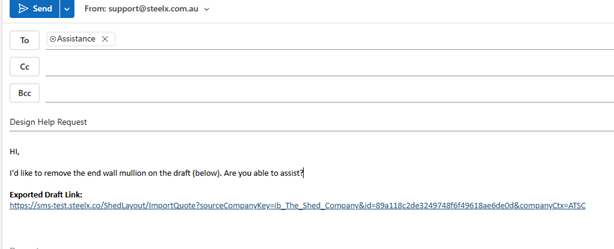
For questions about the design of buildings at draft or quote stage, you would email an Export Quote link to the Assistance team at assistance@steelx.com.au. If you are unsure of where to send the request, email it to support@steelx.com.au.
Examples of issues might be:
- A missing building profile
- A request for help due to an SMS error
- Design change request (i.e. bracing issues or removing roller doors/windows).
- Bugs within SMS.
Explain what you are trying to achieve and ensure you add any screen shots in this email so that the Assistance team have all the information they require.
Assistance will sometimes send you a return Export Quote link with changes to the design of your job. Use that version to generate your quote.
Before exporting a link to the Assistance Team please ensure the building is pinned correctly.
Why this is important
Provides a quick way to share draft or quote designs for troubleshooting.
Ensures the Assistance Team has full context, including screenshots.
Saves time by using links rather than re-creating or manually describing issues.
How to use the export quote function
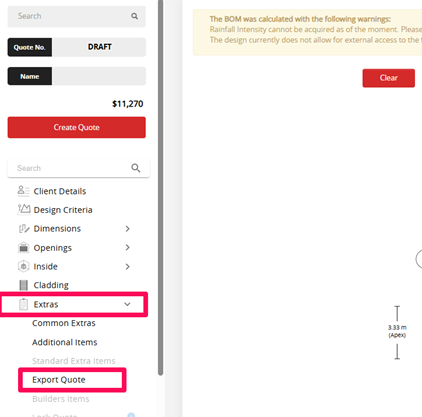
1. In your draft design, open the Extras tab and select Export Quote.
If 'Export Quote' is greyed and you cannot select it, first calculate the design then try again.
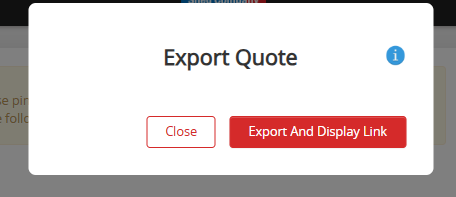
2. SMS will present the Export Quote screen. Select Export And Display Link
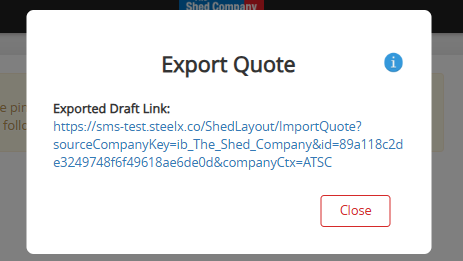
3. SMS will generate the Export Quote link
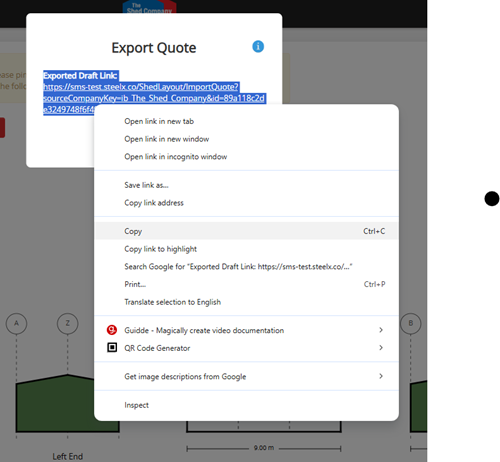
4. Select the available text and copy
5. Paste the resulting text into an email and explain the issue you'd like the Assistance team to help with
Tips, best practices & troubleshooting
 Tips, best practices & troubleshooting
Always calculate the design before exporting if the option is unavailable.
Include screenshots when emailing Assistance so they can clearly see the issue.
Save and reuse return Export Quote links provided by Assistance to avoid rework.
Review & updates
Version history:
v1.0 – 19 April 2025
v2.0 – 01 September 2025
Article information
Category: Support & Troubleshooting
Target audience: SMS Users, Franchise Users
Business owner:
Version: v2.0
Last reviewed: 01 September 2025