
Request Engineering (Site Check)
Overview
This article explains when and how to use the Request Engineering function in ShedSafe. It clarifies what stage this can be done and the implications of requesting engineering too early.
Why this is important
Prevents errors and delays caused by requesting engineering at the wrong stage.
Ensures jobs progress smoothly once changes are finalised.
Helps avoid unnecessary fees for additional engineering requests.
How to request engineering
At quote stage
Never request engineering at the quote stage.
If engineering is requested at this point, nothing will happen, and the quote will need to be restarted.
After the job has been accepted
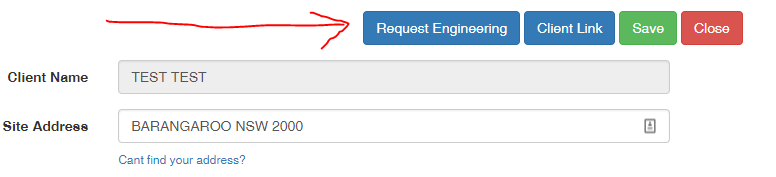
If the Request Engineering button appears in ShedSafe, only click it once you have completed all changes to the job.
If changes are required after requesting engineering, an additional fee will apply.
Tips, best practices & troubleshooting
Always finalise changes in SMS before clicking Request Engineering.
Do not use the Request Engineering button during quoting—wait until after job acceptance.
If you are unsure whether to request engineering, consult with the Support Team first.
Related resources
Review & updates
Version history:
v1.0 – 19 April 2025
v2.0 – 01 September 2025
Article information
Category: Support & Troubleshooting
Target audience: Franchise Users, Estimators, Sales Coordinators
Business owner:
Version: v2.0
Last reviewed: 01 September 2025