
Windows & GSD’s
Overview
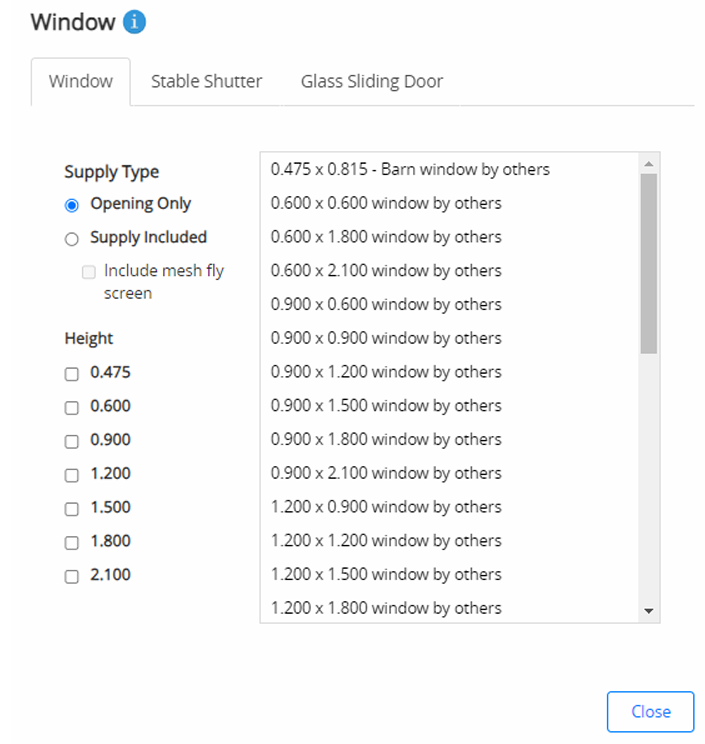
The Windows and GSD’s feature in SMS allows users to select and place openings using a tabbed list and tick box selection process.
Available size options are displayed as height × width, and these measurements represent opening sizes.
Why this is important
Enables flexibility when configuring building openings.
Allows window or GSD (Glass Sliding Door) supply options to be included or excluded from quotes.
Ensures correct documentation and delivery details for supplied components.
Window and GSD supply options
Windows/GSDs by others
Selecting “Window by others” or “GSD by others” creates the opening only — no window or door supply is included.
The quote letter will display the following wording:
Materials to frame up for window opening(s) including a header flashing to suit one 1200h × 1800w window (supply of the window is NOT included).
Supply included
Some franchises have opted to include the supply of windows or GSDs within the quote.
When available, this option will appear on-screen as “Supply included”.
The quote letter will typically read:
One (1) 790h × 1505w window (supply of the window is included).
Note:
Windows and GSDs are not part of the consolidation process.
All windows supplied by AMIA (Advance Metal Industries Australia) are delivered directly to your store, and you are responsible for arranging delivery to site.
Selection process
To add a window or GSD in SMS:
Open the Openings tab.
Select the desired window or GSD option.
Click on the building elevation where you would like to place it.
Adding multiple windows
To add multiple windows of the same size, continue clicking in each desired bay.
To change size, reselect the window or GSD and click on the building again.
Adjusting position
Use Position Components to move a window or GSD to the required location.
The BOM components are not pre-cut for windows or GSDs, allowing flexibility for clients to reposition openings on-site.
Windows can be placed above or below a mezzanine, depending on where you click in the design layout.
Removing and repositioning windows or GSDs
Right-click over a window or GSD to:
Delete the opening, or
Reposition it within the design.
Tips, best practices & troubleshooting
Confirm supply inclusions with your client before finalising the quote.
Use the Position Components tool to maintain alignment across multiple bays.
Communicate clearly whether the windows or GSDs are being supplied or excluded to avoid confusion during delivery.
For supplied windows or doors, coordinate with AMIA for delivery tracking.
Related resources
Review & updates
Version history:
v1.0 – 19 April 2025
v2.0 - 11 November 2025
Article information
Category: Estimation View & Shed Design
Target audience: Estimators, SMS users, and design teams
Business owner:
Version: v2.0
Last reviewed: 11 November 2025